It's only the 20th, and you don't know where your paycheck went.
A year from now, you'll be exactly where you are today. Unless you start measuring your progress.
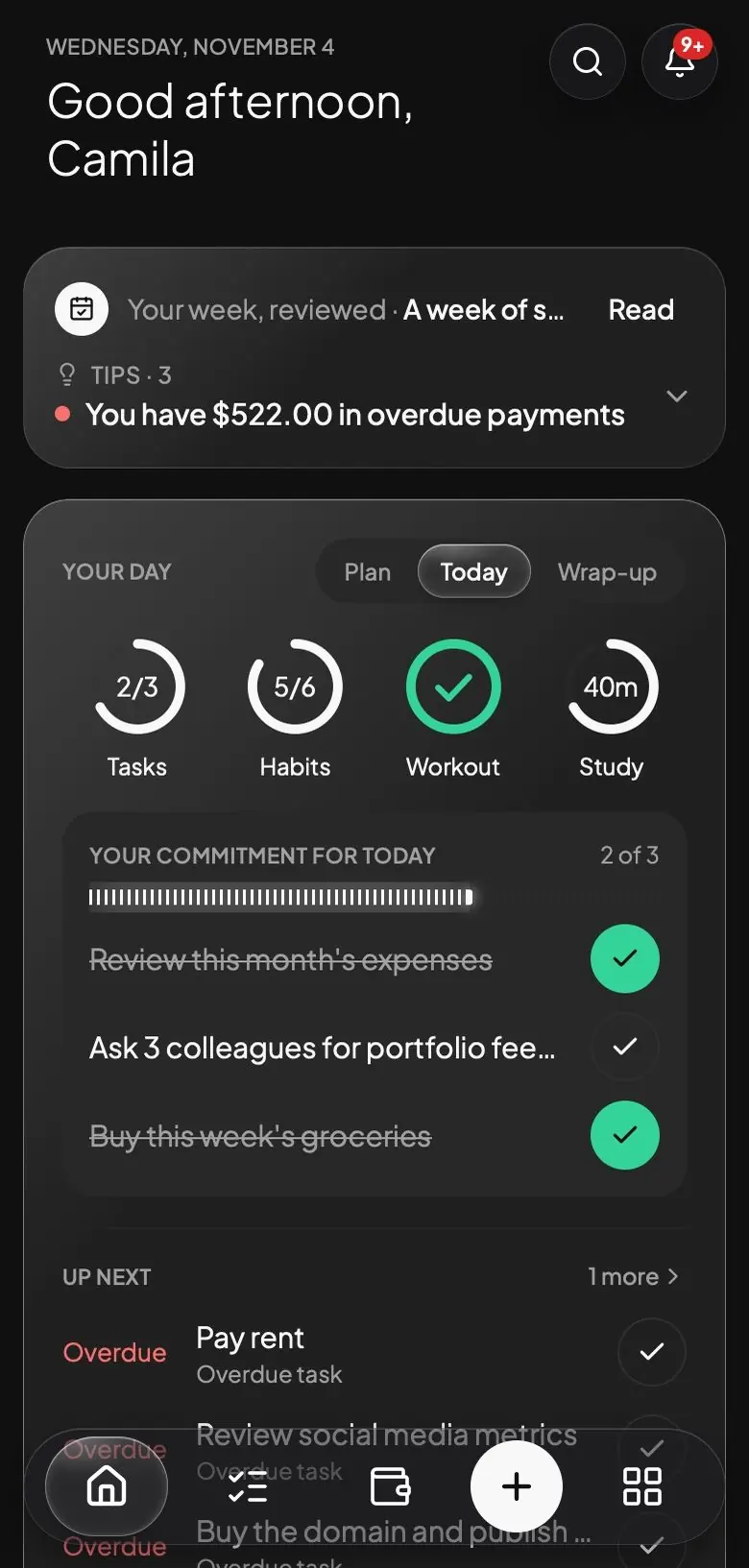
Svolta is the app where you record your money, your habits, your workouts, your studies and your goals, and see whether you're truly making progress.
See how it worksWorks on your phone and your computer.7:00 AMReminds you of today's routine.
8:45 AMReminds you before each task.
1:20 PMWarns you before you go over.
4:00 PMReminds you what's left to do.
8:00 PMHelps you keep your streak.
 SVOLTAnowClose to your limitFood: you've used 81% of your limit this month.SVOLTAnowDon't break your streakRead for 20 minutes (24 days)SVOLTAnowToday's routinePush: Bench press, Overhead press and 2 more.SVOLTAnowToday's routinePush: Bench press, Overhead press and 2 more.SVOLTAnowTask reminderTeam meeting, 9:00 AM (in 15 min)SVOLTAnowClose to your limitFood: you've spent $203.83 of $250.00 (81%) this month.SVOLTAnowToday's tasksStill on for today: Send weekly reportSVOLTAnowDon't break your streakRead for 20 minutes (24 days)
Every day you don't record is a day you don't know if you moved forward.
This month's billRent
You forgot to pay the rent, and found out when the late fee arrived.
Your training · 3 weeks ago
You haven't trained in three weeks, and you hadn't even noticed.
Your goal for this year
Your goal for this year is right where it was in January.
You don't lack motivation. You lack a way to see if you're moving forward.
See Svolta in one minute.
0:001:02
Svolta works in three steps.
1
You log it in seconds.
You write to the assistant what you did, the way you'd write to a person: "I spent 18 on dinner" or "I did legs today." You can also record a voice note or log it yourself in each section.
I spent 18 on dinner
Expense$18.00 · dinnerUndo
I logged it as an expense under Food, paid from your Main account.
2
It reminds you in time.
Svolta reminds you of your tasks, your habits, your payments and your routine for the day. If you've already used 80% of what you set for food, it warns you before you go over.
Wednesday, November 44:00SVOLTAnowToday's tasksStill on for today: Send weekly reportSVOLTAnowClose to your limitFood: you've spent $203.83 of $250.00 (81%).
SVOLTAnowToday's tasksStill on for today: Send weekly reportSVOLTAnowClose to your limitFood: you've spent $203.83 of $250.00 (81%).3
You see your progress.
You see how far you've come in each area, month by month, and you get suggestions based on what you record. What you do with that is up to you.
Bench press · Top weight54.5 kg +14.5 kg since July
JulyToday
AI assistant
Your personal assistant, inside Svolta.
You write to it the way you'd write to a person. It doesn't just answer: it also records, moves and corrects things in your account.
Expenses, monthly payments and installment purchases. You write several things in one message and it saves each one in its place.
It understands “tomorrow”, “on Friday” or “every Monday”. Each task shows up on your calendar and you get its reminder.
Your routines, your goals, your exams and your notes, just by asking and without filling out forms.
When your day changes, ask it to move a workout or a task, correct a record or set a limit.
Ask what's on for today or how much you spent in any period. If it's about money, it gives you your numbers and you decide what to do with them.
Record what you did, it turns it into text and logs each thing in its area, without you having to open each section.
AssistantLog or ask anything
I spent 12 on lunch and 45 on gas
Expense$12.00 · Lunch
UndoExpense$45.00 · Gas
UndoDone: I logged lunch under Food and gas under Car, from your Main account.
I pay Netflix 15 every month, on the 5th
Recurring payment$15.00 · Netflix
UndoI saved Netflix as a $15 monthly payment, repeating on the 5th of each month.
Tomorrow at 9 I have a team meeting and remind me to pay the electric bill on Friday
TaskTeam meeting · Thursday, 9:00 AM
UndoTaskPay the electric bill · Friday
UndoDone: the meeting is set for tomorrow at 9:00, and paying the electric bill for Friday.
Every Monday at 8 check email
Recurring taskCheck email
UndoI created the task Check email for every Monday at 8:00.
Create a Legs routine with squats, leg press and deadlift, 4 sets of 10
RoutineLegs
I created the Legs routine with squats, leg press and deadlift, 4 sets of 10 each.
I want to save 1,500 for a trip to Cusco before June
GoalTrip to Cusco
I created the goal Trip to Cusco, with a target of $1,500 by May 31.
I have a Math exam on November 20
ExamMath · November 20
Got it. I'll remind you 7 days before, the day before and the same day.
Move Legs to Thursday at 6 PM
Training planLegs · Thursday, 6:00 PM
Done: Legs is set for Thursday at 6:00 PM. It only changes this week.
It was 14, not 12, the lunch
Expense · change saved$14.00 · Lunch
UndoCorrected: lunch is now $14.
What's on for today?
Today you have: - Send the report, your commitment for the day - Pay the phone installment of $40 - Your habits Read for 20 minutes and Meditate
How much did I spend on food this month?
You've spent $203.83 on Food this month. Your limit is $250, so you have $46.17 left.
I did Legs, mark my reading habit and I studied English for 40 minutes
TrainingLegs
HabitRead for 20 minutes
Study session40 min · English
UndoDone: I logged Legs, marked your habit and added 40 minutes of English.
Everything you want to improve, in one place.

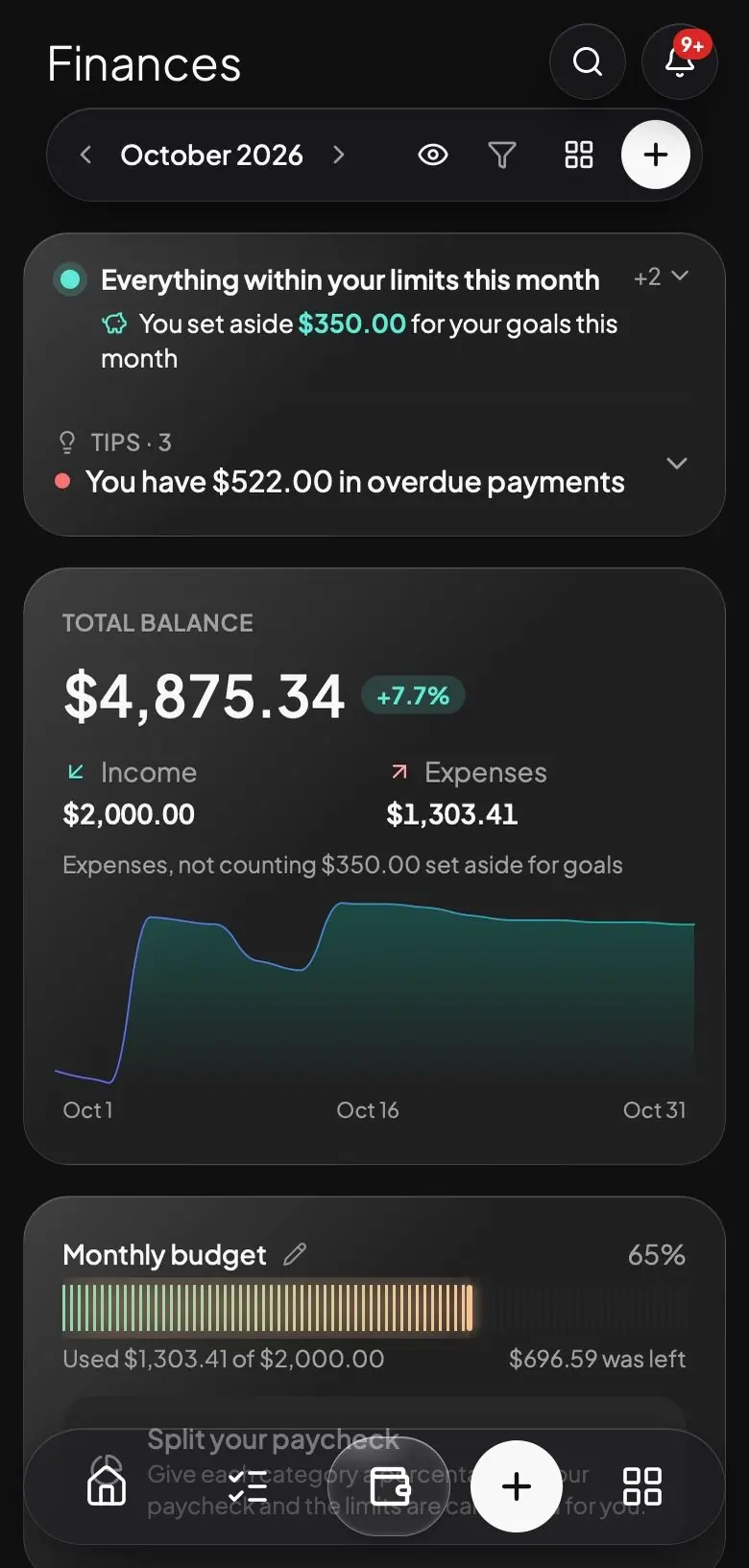
Finances
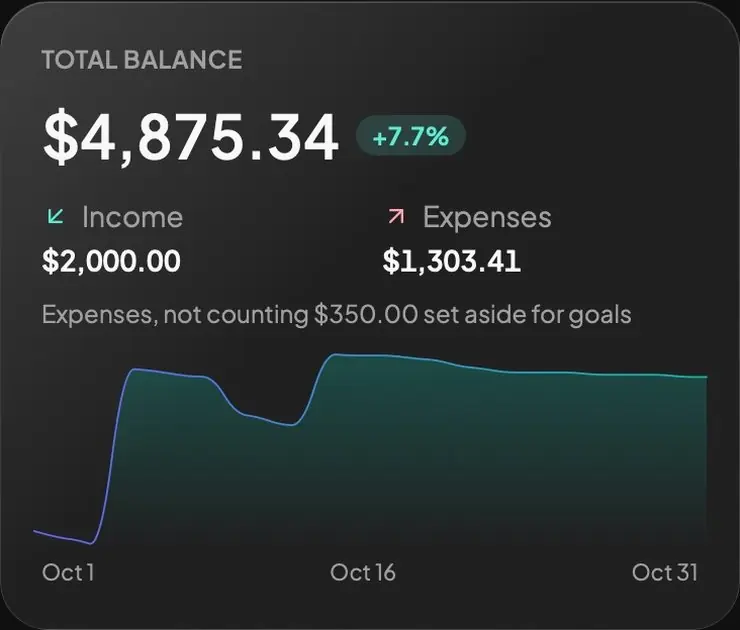
You know where your money goes.
- Log your expenses and income in seconds.
- Set a limit for each category and get a warning at 80%.
- See how much your small daily expenses and subscriptions cost you per year.
- Split your paycheck into the percentages you choose.
- Keep track of your cards and installments, with a reminder before each payment.
- And much more, like importing statements and seeing your net worth.
 SVOLTAnowClose to your limitFood: you've spent $203.83 of $250.00 (81%) this month.
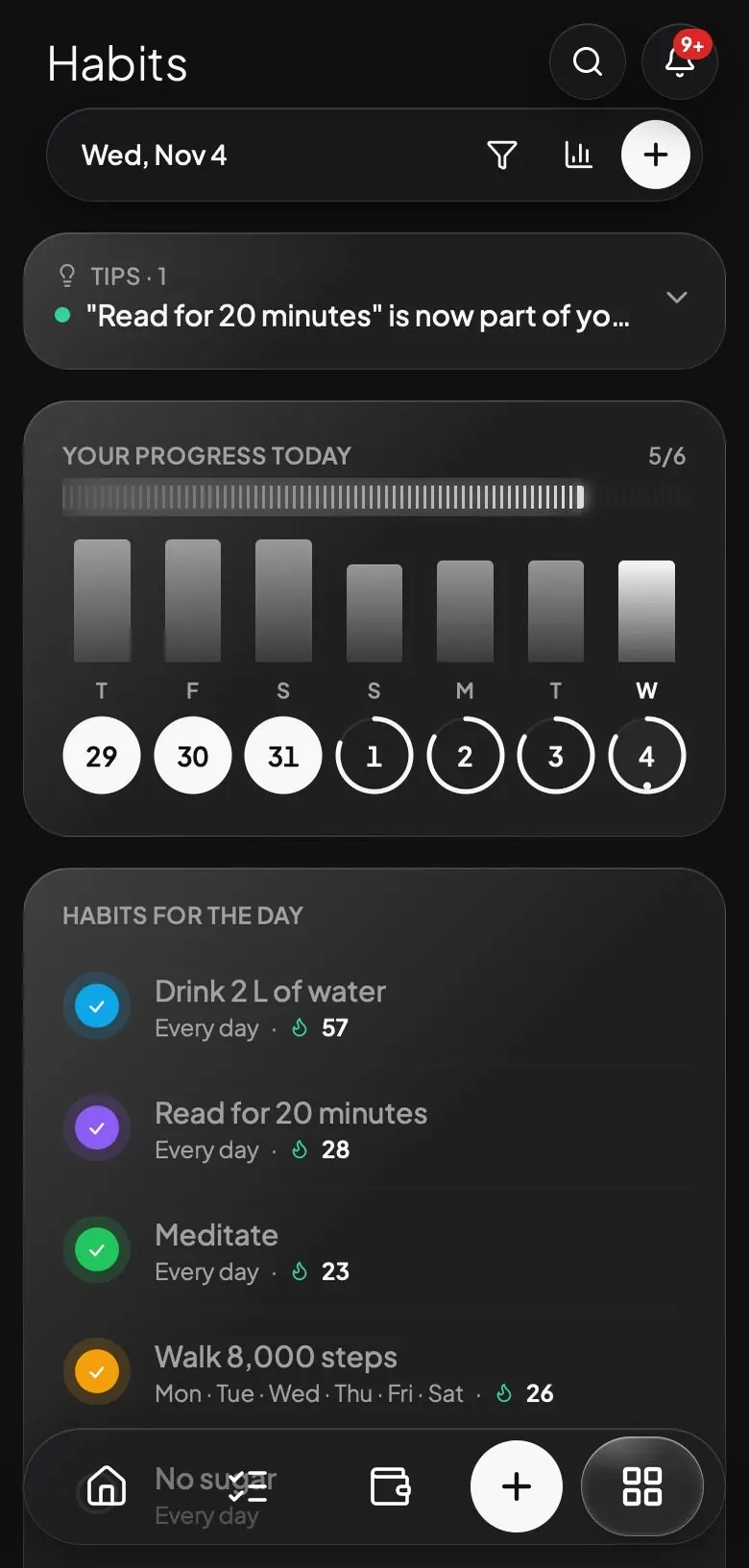
Habits
You beat yesterday's you.
- Choose the days and time for each habit.
- Get a reminder at that time so it doesn't slip by.
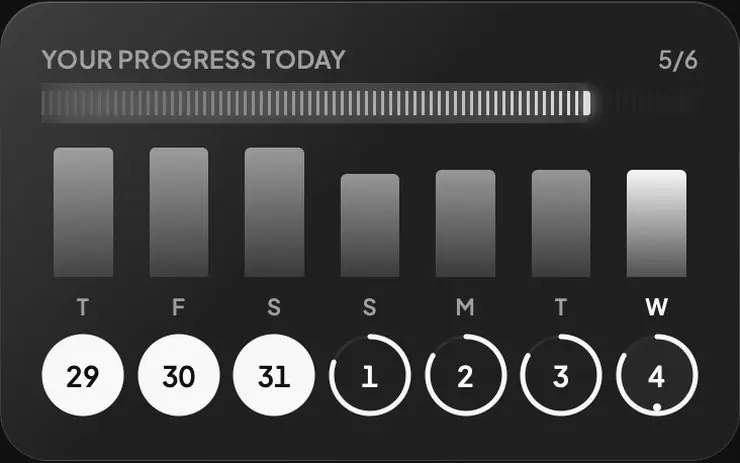
- See your progress for the day, the week and the month.
- Get a notice at night if your streak is at risk.
- Compare each week with the last and see which habits improved.
 SVOLTAnowDon't break your streakRead for 20 minutes (24 days)
Training
You know if you're really growing.
- See what you lifted last time on each exercise.
- If you hit all your sets, you get a suggestion for how much to add.
- Follow your records and your progress.
- Log weights, calisthenics, cardio and circuits like AMRAP or Tabata.
- See which muscle groups you're neglecting.
Tasks and calendar
You don't miss what matters.
- Write down several tasks in one sentence.
- Get a reminder before each task with a time.
- See it all on your calendar and connect it to Google Calendar.
- Repeat a task Monday to Friday, every two weeks or however you need.
- Choose your commitments each morning and see how many you keep.
SVOLTAnowTask reminderTeam meeting, 9:00 AM (in 15 min)Study
You know how much you really study.
- Track your real time per subject.
- See which topics are due for review.
- Keep your exams and assignments in view.
- Build your weekly plan and get a reminder when each block starts.
- Get a reminder a week before each exam, the day before and on the day.
Goals
You know if you'll reach your goal.
- Create money goals or any other kind.
- Connect your tasks to each goal.
- See whether you're ahead or behind.
- See how much you need per month to get there by the date you chose.
- If your goal is a project, it moves forward with each task you complete.
Notes
Your ideas connected to everything.
- Mention tasks, habits and goals inside a note.
- See the map of connections that builds itself.
- Open a goal or a subject and see the notes that mention it.
- Find any note with the search.
The difference between thinking you're moving forward and knowing it.
Without recordsWith Svolta
You find out you overspent when there's no money left.
You get a warning when you reach 80% of your limit.
You can't remember how much you lifted last time.
You see it as soon as you open your routine.
You remember the task when it's already too late.
You get a reminder in time.
You think you're doing fine, but you don't know.
You see your progress month by month.
All of this, for one price.
There are no basic plans or locked features. What you see here is yours from day one.
$6.99/mo
All modules, no locked features, no lock-in. You pay month to month and cancel anytime.
I want my access to SvoltaThat's less than 25 cents a day. Five well-known apps, paid for separately, would cost $44.97 a month.
- AI assistant included.
- No commitment.
- Cancel from the app, no hassle.
- Works on phone, tablet and computer.
- Download your data whenever you want.
What people ask before joining.
Can I cancel whenever I want?
Yes, from Settings, at any time and with no penalty. You do not have to write to anyone: it cancels in a couple of taps, you are not charged again, and your access stays active until the end of the period you already paid for.
Do I have to install anything?
You don't need to install anything: you log in from your computer's or phone's browser. If you like, you can add Svolta to your home screen to open it like an app, with notifications. It doesn't go through any app store and takes up no space.
Is my data safe?
Yes. Everything is saved to your account, not to a single device, so if you switch phones or computers, everything is right where you left it. You can download all your data whenever you want, and delete it or close your account from Settings. We don't sell or share your information.
Do I have to connect my bank?
No. Svolta does not connect to your bank or ask for banking passwords. You log what happens by writing to the assistant, or import your statement and review each transaction before confirming it.
Is it worth it if I only want to use part of it?
Yes. From Settings you turn off the areas you won't use, for example Training or Studies, and they disappear from the menu, the home screen, the notifications and the tips. Tasks and Calendar always stay. If one day you want to use them, you turn them back on.
Does Svolta give financial advice?
No. Svolta helps you record and organize your money: it shows you what you spend on, how you're doing against the limits and goals you set, and reminds you before each payment. It doesn't tell you what to invest in, which debt to pay first or how much to save, and nothing it shows is financial, investment or credit advice. The decisions about your money are yours.
Goals get done when you can see your progress.
Svolta comes from the way I see life. To me, some parts of it are worth taking care of every day: your money, your health, what you learn and the goals you set for yourself. I know not everyone sees it that way, but if you made it this far, you probably do too.
I think where almost all of us fail is not the will, but keeping track. We forget to write things down, we don't have a place at hand to do it, and without that there is no way to know whether we are growing or just going in circles.
That is why I created Svolta: one place, always with you, to track your progress in the areas that matter most in your life. In the end everything comes down to discipline and consistency, and when you see your progress in each area, reaching your goals gets much faster.
It is the place I was missing. I hope it becomes yours too.
SANTIAGOMARTÍNEZ
CEO and Founder of Svolta
Start today, and a year from now you'll be able to look back and see how far you've come.
Start for $6.99 a month